Fencing video analysis app
Upload a fencing bout and FencingLab's AI breaks it down action by action — attacks, parries, ripostes and footwork, each with a timestamp — then scores your technique and tells you what to work on. Foil, épée and sabre.
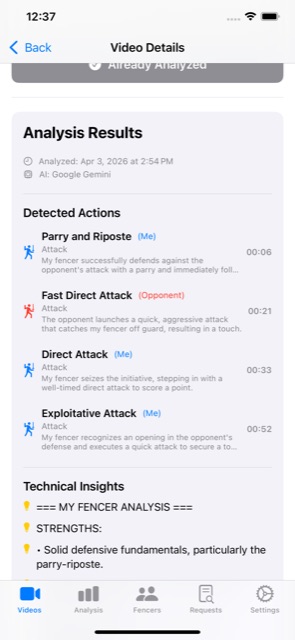
What the video analysis gives you
- Every action, timestamped. Attacks, parries, ripostes, counter-attacks and footwork are detected and listed with the moment they happen, so you can jump straight to them in the video.
- Technique scores. Accuracy, Speed, Technique and Tactics, each scored from 0 to 100 — for you and for your opponent.
- Coaching insights and drills. Strengths, weaknesses and specific, actionable drills based on what happened in the bout.
- Weapon-aware. The analysis adapts to foil, épée or sabre — right-of-way, target area and typical tactics differ, and so does the feedback.
How fencing video analysis works
- 1. Add a video. Upload a bout from your computer at fencinglab.app, or record and import it in the iPhone app. Training bouts, drills and competition videos all work.
- 2. Choose the analysis. Local AI runs on FencingLab's own servers; every account includes 5 Local AI analyses a month (unlimited with a subscription). Cloud AI uses credits: immediate results in under a minute, or batch overnight at half the cost. You can also analyze just the segments you select on the timeline.
- 3. Review and improve. Read the action breakdown, scores and drills, compare with previous bouts, and share the video privately with a teammate or coach.
Tips for a video that analyzes well
- Film from the side of the piste, roughly level with the middle of the strip, so both fencers stay in frame.
- Keep the phone steady (a tripod or a fence post helps) and avoid zooming in and out during the bout.
- Make sure both fencers are clearly visible — telling the AI which side you're on and a distinguishing detail (for example "red socks") helps it follow the right fencer.
Track progress across bouts
Every analysis feeds your profile: score history charts, technique usage with success rates, and comparisons against your own baseline — so you can see whether the work you're doing between bouts is paying off.
Frequently asked questions
What is a fencing video analysis app?
An app that watches a recorded fencing bout and breaks it down for you. FencingLab uses AI to detect each action with timestamps, score Accuracy, Speed, Technique and Tactics from 0 to 100, and give coaching insights and drills for both fencers.
Does it work for foil, épée and sabre?
Yes. FencingLab supports all three weapons and adapts its analysis to each weapon's rules, target area and tactics.
How long does the analysis take?
Immediate analysis returns results in under a minute. Batch analysis runs overnight and uses half the credits.
Can I analyze videos on my computer?
Yes. Upload and analyze videos in any browser at www.fencinglab.app, or use the iPhone app. One account works on both.
How much does it cost?
Every account gets 5 free Local AI analyses each month. New accounts also get a 7-day free trial with every feature and 5 Cloud AI credits. A subscription ($9.99 per month or $99.99 per year) adds unlimited Local AI, fencer profiles and 1-year video storage. Cloud AI is pay-as-you-go with credits (1 immediate, 0.5 batch), with or without a subscription: packs from $0.99 (1), $4.99 (5), $9.99 (10) or $19.99 (20).
Try FencingLab free
5 free Local AI analyses every month and AI daily training plans, plus a 7-day trial with 5 Cloud AI credits — on the web and on iPhone.
Create a free accountAlso see: AI coach · For coaches · FencingLab home